How to Automate Shopware Support (Without Breaking Your SEP Agreement)
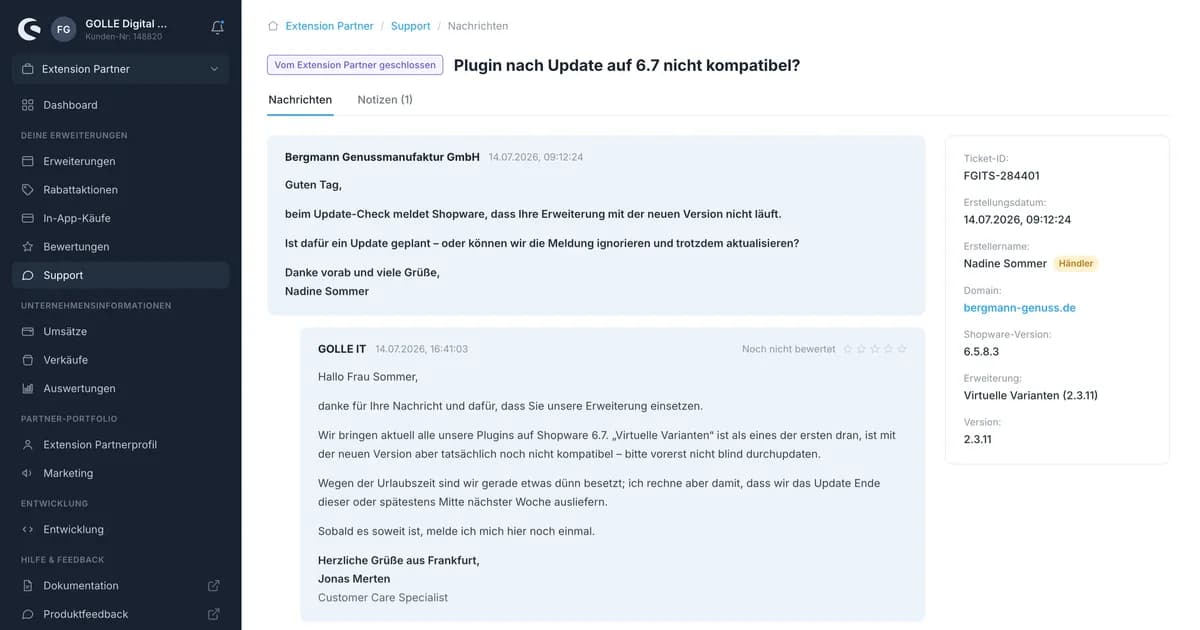
Friday afternoon, 4:30 PM. An email lands in your inbox: "New ticket in the Shopware Store." You log into the producer account, read the thread, type a reply into the text field, hit send. Back to your actual work. Twenty minutes later: the next email, same ritual. Sound familiar?
If you sell your own Shopware extensions in the Store, you know this routine. And you know the SLA clock starts ticking from the very first email. No team workflow, no assignment, no SLA tracking, no automation. Per extension, per customer, every day. With multiple products, Store support turns into its own channel that you have to carry alongside email, chat and everything else.
Let's look at why this is not a side issue, what options exist for automating this support, and how to recognize a solution that actually works.
Why Store support isn't optional
Support for your extensions isn't a nice-to-have. It's part of what you signed up for as a Shopware Extension Partner (SEP). And Shopware has solid reasons to take it seriously.
There are fixed deadlines
The SEP agreement mandates response times. You have up to 4 business days to give a first response to a ticket. Fixing a defect is contractually capped at 6 business days. The public docs occasionally list different numbers (for instance 8 days for bug fixes), but the contract you signed is what actually counts. When in doubt: check the contract, don't guess.
These deadlines aren't a rough guideline for good vibes. They're a binding obligation, and the clock starts when the ticket comes in, not the next time you happen to log in.
Speed sells
Shopware visibly rewards fast responses. The Store listing displays badges like "responds quickly" (reply within roughly 3 days) and "responds very quickly" (average under 24 hours). These badges sit right next to your product. A prospect comparing two similar extensions sees immediately who answers fast.
Support isn't just an obligation, then. It's a sales argument that shows up directly in the listing.
You have to stay in the channel
One point that's often underestimated: written support must run through Shopware's ticket system (SEP 1.3.7). And in your replies, you're not allowed to advertise or point customers to contact options outside the ticket system (SEP 1.3.13).
In practice, that means: you can't pull customers into an external tool, and you can't slip foreign signatures, CTAs or "just email us directly at support@…" notes into your ticket replies. Doing so risks breaching the partner agreement.
The responsibility stays with you
Shopware states this plainly: "the support is your responsibility." Regardless of which tool you use, or whether an AI is drafting replies, you as the partner remain responsible for the answers. That matters a lot once we get into automation.
The real options, at a glance
There are several ways to scale Store support. None of them is perfect. Let's look at each one honestly, pros and cons included.
Option A: Keep doing everything by hand
The status quo. Works fine as long as you have few tickets and are always available. The problem: it doesn't scale. Every routine question ("Where do I enter my license key?") eats time, often from expensive developers. And the moment someone's on vacation, or a release is coming up and tickets pile up, your SLA quickly turns into a liability.
For a single plugin with occasional inquiries, that's fine. With multiple products and a growing customer base, it becomes a bottleneck.
Option B: Build it yourself on the account API
The instinctive move for many developers: "I'll just automate this myself." Shopware does document an account API that lets you connect external ticket systems. But it's worth looking closely here.
The API is officially "not supported" and is primarily designed for migration and read access. Based on current research, there's no clean, documented endpoint for writing to or replying to tickets. A genuine two-way autoreply built on the API therefore sits in a technical gray zone, with the risk that behavior changes or breaks without warning.
The robust path back into the ticket is the email reply: Shopware imports email replies into the matching ticket thread. That keeps you in the channel and sidesteps the API write problem. But you still have to build and maintain everything yourself: sync logic, status reconciliation, attachments, the AI integration, the guardrails, the DPA chain with the LLM provider. That's not a weekend project – it's a moving target you have to keep running indefinitely.
Option C: Middleware into an existing helpdesk
The obvious idea: "I already have Zendesk (or Freshdesk). I'll just connect the Store tickets to it."
Technically that's doable via intermediary tools, but it's never truly native. Field mapping and status sync stay fragile, because generic helpdesks know nothing about the Shopware producer account. And there's a compliance trap: these tools are built to pull customers into their own interface. Foreign signatures, "view ticket" links and CTAs slip into the reply easily. That's exactly what collides with SEP 1.3.13.
Email support is allowed as an optional additional channel. But the Shopware ticket thread remains the mandatory primary channel. Middleware that doesn't respect that shifts the compliance risk onto you.
Option D: A purpose-built, native tool
The fourth option: a tool that understands the producer account and SEP obligations from the ground up. But that only makes sense if it actually stays in the channel and respects the rules instead of working around them. A tool that walks you into the same trap as generic middleware doesn't help.
So how do you tell whether a solution is actually up to the task? There's a clear checklist for that.
What a good solution needs to do
These criteria apply whether you build it yourself or use an off-the-shelf tool. They're the neutral core of the question.
Replies land in the Shopware ticket, as a producer response. No external redirect, no foreign advertising tacked onto the reply. That keeps you SEP-compliant without having to worry about what a signature is quietly dragging along.
Status is mirrored in both directions. Open, resolved, closed – kept in sync between your tool and the Store. Along with attachments and the full history. If you close a ticket on your end, it needs to be closed in the Store too, or you end up with two conflicting truths.
AI with guardrails and a human in the loop. Because the responsibility stays with you, an AI shouldn't be allowed to blindly send everything out. The sensible default is an AI draft that a human approves. And for sensitive topics (money, legal matters, credentials), the AI should automatically hand off to a human. We covered how to secure autonomous agents with two guardrails in more detail in our post on GDPR-compliant AI support.
Data protection handled properly. Ticket content is personal data. That means you need a clean DPA chain (you as the partner, the tool provider, the LLM), named subprocessors, and EU processing as the default, not an option you have to go dig for.
Store tickets unified with your other channels. No second inbox. Your Store tickets belong in the same inbox as email, chat and web forms, with the same rules, SLA settings and assignments.
Fast onboarding. A solution whose setup itself turns into a months-long project defeats the purpose. Connect it, let tickets flow in, get started.
Why we built inbrix
Time to lay our cards on the table: we built inbrix for exactly this problem.
We're a certified Shopware Extension Partner ourselves, since 2013. We sell our own plugins in the Store (including AutoInvoice) and knew the ticket chaos firsthand. For a long time, Store support was a separate channel we had to maintain alongside every other product: log in, read, type, repeat. Before every release, the same question: "Which Shopware version is this customer even on?" We're our own first customer.
Our internal goal was to bring all of that together in one tool. inbrix pulls tickets from the producer account, answers them with AI-assisted drafts and guardrails, and mirrors status and attachments back. Importantly: the reply lands in the Shopware ticket as a producer response, so you stay in the channel. Inference runs in the EU by default, GDPR-compliant and made in Germany, hosted in Frankfurt. inbrix is AI-first, but works completely without AI too, if you'd rather write every reply yourself.
We built this for ourselves, and now we're offering it to other Shopware agencies too. If you want more background on our GDPR approach, check out the privacy-first helpdesk page. And if you manage multiple clients at once, the helpdesk for agencies is worth a look too.
Frequently asked questions about Shopware support
Am I allowed to answer Shopware support tickets with AI?
Yes. The SEP agreement doesn't prohibit AI assistance. It requires that support run through the Shopware ticket system (SEP 1.3.7) and that you remain responsible for the answers. That's why an AI draft with human approval makes more sense than a blind autoreply, especially for sensitive topics.
Do I have to stay in the Shopware ticket system?
For written support: yes. The ticket thread in the producer account is the mandatory primary channel (SEP 1.3.7). Email support is allowed as an optional additional channel, but it doesn't replace the ticket channel. And you're not allowed to point customers, in your replies, to contact channels outside the ticket system (SEP 1.3.13).
What response times does Shopware require?
The SEP agreement requires a first response within up to 4 business days and a defect fix within up to 6 business days. Public documentation sometimes lists different numbers; the contract you signed is what counts. Faster responses are also rewarded with Store badges.
Is automation GDPR-compliant?
It can be, if the fundamentals are in place. Ticket content is personal data, so you need a clean DPA chain with everyone involved, named subprocessors, and ideally EU processing as the default. That's exactly what inbrix is built around: processing in the EU, hosting in Germany. This isn't legal advice; when in doubt, clarify your specific situation with your data protection officer.
Can I have tickets answered automatically?
Technically possible, but worth doing carefully. A genuine two-way autoreply built directly on the account API sits in a gray zone, since there's no officially supported write endpoint. The robust path is the email reply that Shopware imports into the ticket thread. Because the responsibility stays with you, an AI draft with approval is usually the smarter default over fully automatic sending.
Where to go from here
If you want to scale Store support without breaking your SEP obligations, it's worth looking at the details of the integration. Here's how the Shopware integration works, showing step by step how tickets flow in, how status gets mirrored, and how the reply ends up in the right channel.
The fastest way to see it in action: in a demo, we'll walk through the sync on your actual tickets – 20 minutes, your account, your questions. For Shopware agencies getting in early, there's also a founding access tier with the full feature set and a free migration from your old helpdesk.
Note: inbrix is not an official Shopware integration. The connection works through the publicly accessible producer account. Shopware and the Shopware logo are trademarks of shopware AG. This article is not legal advice; for binding guidance on your SEP obligations, contact Shopware or seek legal counsel.