The platform in detail

Everything modern support needs. In one tool.

From autonomous AI agents to a Confluence-class knowledge base to a REST API, MCP server and webhooks. AI-native, GDPR-compliant, hosted in Germany.

Start free
The core

inbrix AI. A colleague, not a chatbot.

Every AI agent is a real user on your team: it gets tickets assigned, replies under its own name, has personality, tools and a memory. Externally indistinguishable from a human, internally 100 % transparent.

Battle-testedBacktested on over 2,000 real support tickets – in almost every case at least as good as a human, often better.
The bot is a user

No second system, no parallel world. You create an agent like a colleague: avatar, name, title. From then on it shows up on the team, picks up tickets and writes under its own name.

Live configurationDrag the sliders. The decision below changes with them.
Lena HoffmannSupport Specialist · lena@bot.golle-it.de
Personality & voice
Autonomy
Tools

Always on: knowledge base, customer context & handover to a human

Two guardrails, one decisionEvery answer passes two independent checks: Can I solve this? And: Is my answer risky? Only when both pass does it go out autonomously. You set the thresholds.
Example ticket · #51204“The reset link never arrives and I can't get into my account anymore.”
1
SolvabilityCan I solve this?
Score 0.91your threshold 0.80
2
SensitivityIs my answer risky?
Score 0.08your threshold 0.30
Answered autonomouslyCompetent enough and low-risk. Goes out immediately under the colleague's name.
Vision

inbrix AI reads screenshots too.

Customers rarely send clean bug reports, but almost always a screenshot. inbrix AI looks at it, spots the problem and knows what to do.
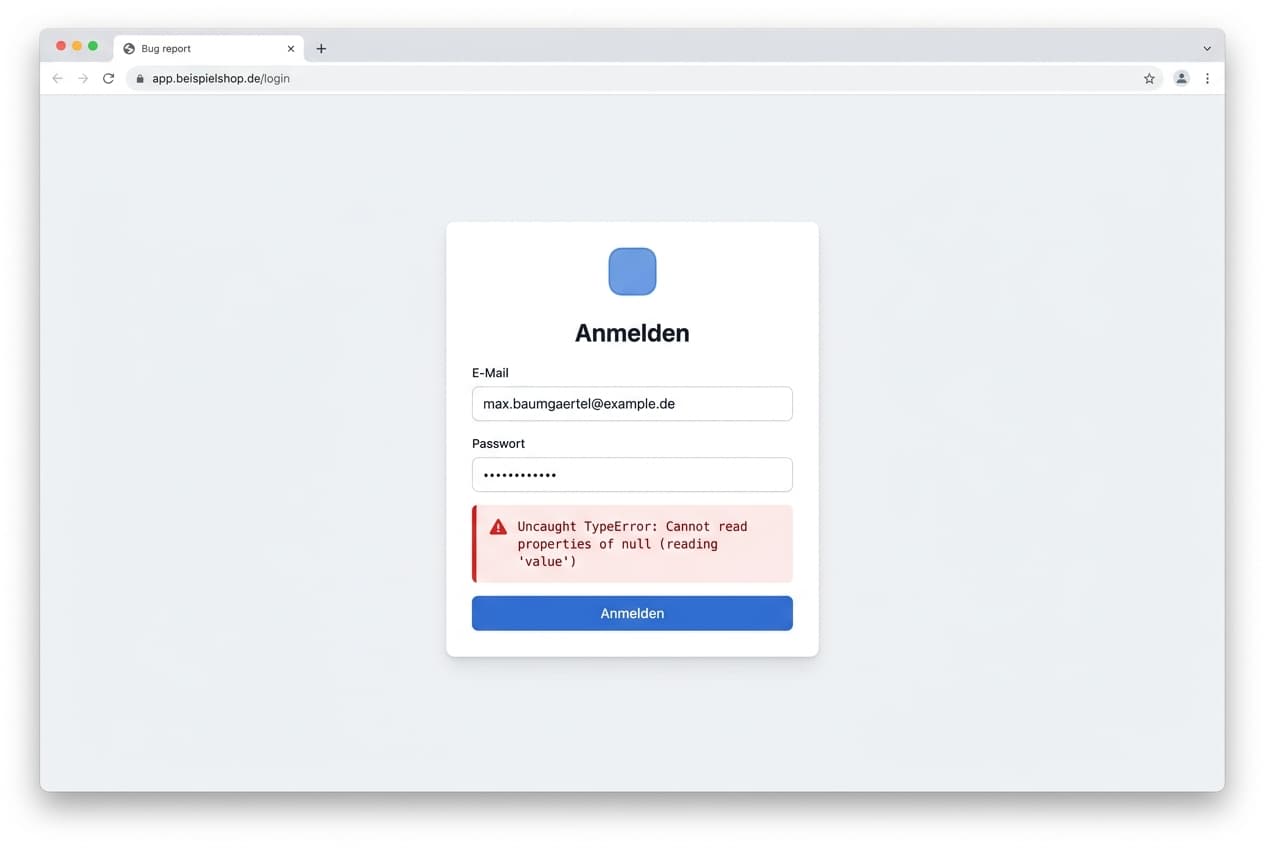
Screenshot of a login page with a JavaScript error message
Recognized

A login screen with a red error message: “Uncaught TypeError: Cannot read properties of null (reading 'value')”.

Understood

A JavaScript error in the login form, not a wrong password. A script accesses a field that hasn't loaded yet.

Next action

Flagged as a technical issue, priority raised and handed to the second-level agent.

Sentiment analysis

Notices how the customer feels.

inbrix reads the mood of every message. Frustrated customers are prioritised and handed to a human sooner; happy ones get a review request at the right moment.

Frustrated: the customer complains about an error message.Annoyed: first reply, still sceptical.Neutral: the bot has understood the problem.Warming up: a solution is emerging.Satisfied: problem solved, the customer says thanks.Very happy: the customer actively offers a review.
😠 frustrated🙂 happy
Automatic prioritisationNegative sentiment raises the priority.
Earlier handoverIf the mood turns, a human joins sooner.
CSAT at the right timeReview requests only once the customer is happy.
A framework, not a single bot

When level 1 gets stuck, level 2 takes over.

Agents can hand off not only to humans but to each other. A first-level bot answers the everyday; when it gets deeply technical it can pass to a specialised code agent that reads source code, before a human makes the final call.

L1Anna · First levelAnswers email and chat in seconds. Knowledge base, solved tickets, vision, web.
L2Thomas · Second levelReads your source code and the systems behind it and pinpoints the root cause with file and line.
Human

A bot never hands off to a bot that already worked the ticket. A human is always at the end of the chain.

It learns

Memory on four levels.

1
Per ticketNotes within the running case.
2
Per customerSoftware version, settings, preferences. Never asks again.
3
Learned lessonsProblem, solution, did it help? Reinforced by CSAT and reopens.
4
Your feedbackThumbs up or down flows straight into the next answer.
Full transparency
Bot activity · #51204

Every step, every source, every decision. Auditable like a log.

Read knowledge base3 hits
Reset flow · Account FAQ · Password guide
Checked 3 solved ticketssimilar cases
#48120 · #49233 · #50871, same cause
Scored solvability0.91
above your threshold of 0.80
Scored sensitivity0.08
no money, no legal, no access. Low-risk.
Answered autonomously47 sec
sent under the name Lena Hoffmann
Omnichannel inbox

Four channels, one inbox.

Email, chat, web tickets and Shopware land in one place, with the knowledge base and AI right beside them. Every channel becomes a ticket and gets the same automation.

Email

Best-in-class threading, forward detection, loop and bounce protection, inline images, undo send.

Chat widget

Embeddable live chat with one line of code. Every conversation becomes a ticket.

Web tickets & portal

A public form with email verification. The customer tracks their ticket via a signed link.

Shopware

Store tickets and producer account right in your inbox. Shop credentials are never stored.

More on the Shopware integration
Knowledge base

An editor like Confluence. One index for the AI.

Own pages, uploaded files and crawled websites in one tree, one index, one search. The bots read all of it before answering and cite the source.

Manual
HeadingsTablesImagesCalloutsCodeAnchor links
Reset your password
Tip: the reset link is valid for 60 minutes. Check your spam folder too.
WYSIWYG editorTables, images, info boxes, code blocks and stable anchors. Feels like Confluence.
Crawl a website via sitemapPoint it at a sitemap, every page is read, cleanly extracted and refreshed weekly.
PDFs & filesUpload PDF, Markdown, HTML. The bot even cites the page number.
Public or internal, per pageAn internal runbook and a public manual page in the same tree. Internal stays internal.
Public manualPublished pages become an SEO-ready manual with search and dark mode.
Confluence importerBring your existing wiki over: macros become callouts, images migrate, hierarchy is preserved.
Chat widget

A live chat that answers like a human.

One line of code and your support chat is live. It knows your knowledge base, reads images, knows which page the visitor is on, and leaves nobody hanging.

AI Act notice
Anna · inbrix/login
Write a message …
Human presenceName, avatar, typing indicator. No “AI” label unless you want one.
Page contextThe widget knows which page is open and answers specifically to it.
Images & visionPaste a screenshot, the bot analyses it automatically.
No dead airIf it can't help right away, a short holding note goes out and a human takes over.
OnboardingAsk for name and email up front or start anonymous. Configurable per widget.
ProactiveTime-based teaser, quick replies, offline state outside business hours.
Notifications

You'll know. Exactly the way you want.

In-app, push, Slack DM and email digest. Configurable per event and per channel, with quiet hours, escalation and coalescing, so five chat messages are one interruption, not five.

Try it: click the cells.
In-app
Push
Slack
Email
New ticket
Assigned to me
Bot hands to human
Customer replied
New chat
Mention
SLA warning
Quiet hours & do not disturbConfigurable per person. Urgent things can break through quiet hours, or not. You decide.
Automation

When this happens, do that.

Build rules that automatically tag, assign, prioritise, notify or fire a webhook. No code required.

WhenSubject contains “invoice”
Then
Tag: BillingAssign to Finance
WhenSentiment turns negative
Then
Priority: highHand over to a human
WhenA new chat comes in
Then
Bot repliesSlack notification
WhenTicket solved & customer happy
Then
Ask for a reviewFire a webhook
Developer-first

A real API. Not an afterthought.

MCP server first: attach claude.ai, ChatGPT or Gemini as a connector to inbrix with zero setup. Plus a real REST API and signed webhooks to automate everything and connect inbrix to your stack.

Controllable via
MCP serverclaude.ai, ChatGPT and Gemini connect as a custom connector with no client setup at all. Dual bearer auth via token or OAuth.
REST APIBearer-authenticated, with scopes (read, write, admin, ai) and cursor pagination. Read, reply to and update tickets.
WebhooksHMAC-SHA256 signed, with retries and a delivery log. ticket.created, message.created, sla.warning and more.
// claude.ai → Custom Connector
{
  "url": "https://api.inbrix.ai/api/mcp",
  "auth": "oauth" // zero client setup
}

tools search_tickets get_ticket reply_ticket
      add_note update_ticket ticket_stats

Plus: API tokens with scopes, workspace roles (owner, admin, agent) and webhooks per organisation or per workspace.

Import service

Moving from your old helpdesk? We'll do it. For free.

Coming from Zendesk, Freshdesk, Intercom or another system? We handle the entire migration for you: all tickets with history, contacts, customers and attachments. In person and under NDA.

€2,000€0for the first 100 founding customers
0of 100
founding slots claimed

All under NDA. Your data is yours, we only look at it together with you.

Analysis of your existing ticket system
Migration of all tickets incl. history and timestamps
Contacts, customers and attachments
Knowledge base and Confluence import
Personal onboarding on your real data
We support every import source:
ZendeskFreshdeskIntercomZammadGorgiasConfluenceIMAP
Coming soon

And there's more.

A look at what's coming next.

Coming Q4 2026
AI phone support

Your customer calls, inbrix AI picks up: understands the request, answers with the same knowledge base and the same two guardrails as in chat, and files everything neatly as a ticket in your inbox.

  • Natural voice, available around the clock
  • Automatic transcription & ticket
  • Handover to a human any time

Ready to empty your inbox?

Start free or get a live 20-minute tour of inbrix.

Start free
Ask the AI

Ask your AI about inbrix.

Let ChatGPT, Claude or Perplexity compare honestly – they already know inbrix.

Get started

Create your account.

Name, business email, done. No credit card, no contract term.

  • Every feature in your first month
  • Your data stays in Germany
  • Cancel any time, export included